

The Problem With Stateless Search
You built a RAG pipeline. It works. A user asks a question, OpenSearch retrieves relevant documents, and the LLM generates a grounded answer. Beautiful.
Then the user asks a follow-up.
“What is the population of Seattle?” Great answer. “How does that compare to Austin?” The system has no idea what “that” refers to. It forgot Seattle the moment it answered.
This is the wall every search application hits. Real users do not ask one question and leave. They have conversations. Each question builds on the last. “Which one is growing faster?” only makes sense if the system remembers we were talking about Seattle and Austin.
A stateless RAG pipeline cannot handle this. It treats every request like the first one.
What Makes a Chatbot Different from RAG?
Two things. Conversation memory and intelligent tool routing.
On Day 7, we built RAG with OpenSearch. That gave us grounded answers from a single knowledge base. Today, we add memory so the chatbot remembers what was said before. And we add routing so it can pick the right knowledge base automatically when you have more than one.
The result is not just a search with a chat interface. It is a system that reasons about which data source to query, remembers what it already told you, and builds on previous answers.
How the Architecture Works
What happens when a user sends a message to an OpenSearch chatbot?
The question arrives through the Execute Agent API. If the user includes a memory_id, the agent knows this is a continuation of a previous conversation. It loads the chat history from its memory index.
Then it decides which tools to run. For a RAG chatbot, that usually means a VectorDBTool performing a semantic search against a knowledge base. But if you have multiple knowledge bases, the agent reads each tool’s description and picks the one that matches the question.
The retrieved documents and conversation history get assembled into a prompt. That prompt goes to the LLM. The LLM generates a response grounded in real data, not its training memory. And finally, the question and answer get stored back into the conversation index so future questions have context.
All of this happens inside OpenSearch. No external orchestration service. No separate vector database. No custom middleware. One API call through the ML Commons plugin.
Three Agent Types, Three Decision Styles
OpenSearch gives you three agent types. Choosing the right one determines how your chatbot thinks.
The conversational_flow agent runs tools in a fixed sequence. Think of it like a recipe. First search the knowledge base, then send results to the LLM. Always that order.
The output of one tool flows into the next through variable chaining. Predictable. Easy to debug. Perfect when you have one knowledge base and a straightforward search-then-answer pattern.
The conversational agent lets the LLM decide which tool to call. This is the dynamic option.
You give it two knowledge bases, one for population data and one for tech news, and it reads the tool descriptions to figure out which one matches the question.
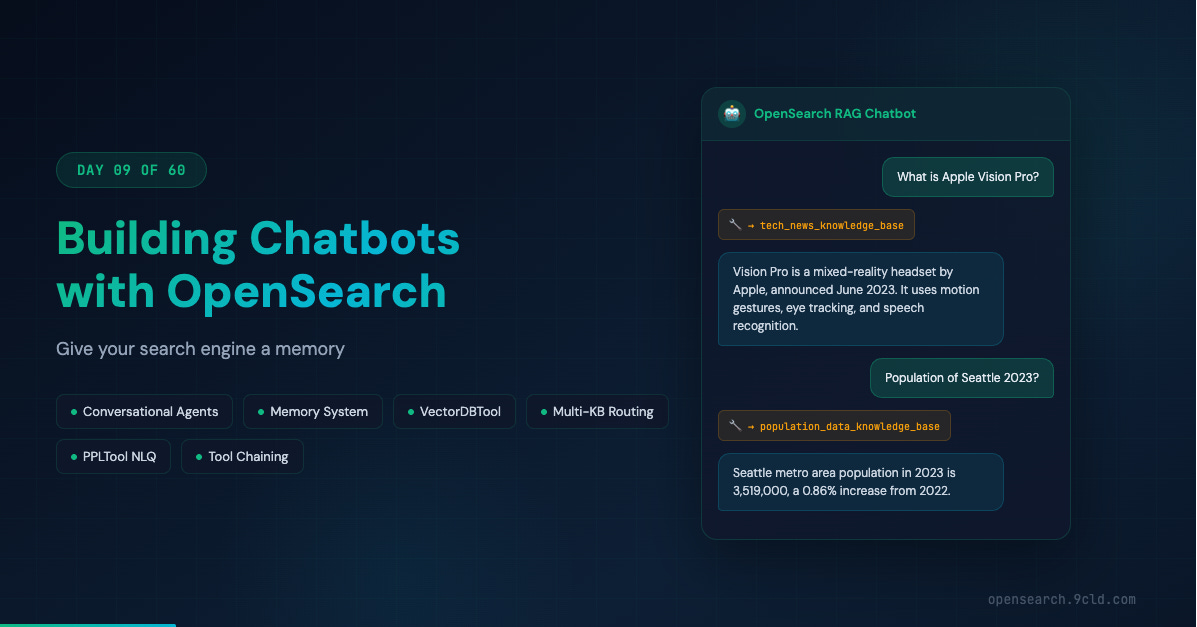
Ask “What is Vision Pro?” and it picks the tech news tool. Ask “Population of Seattle?” and it picks the population tool. This is the one you want for multi-domain chatbots.
The flow agent is the stateless version. Runs tools sequentially but does not store conversation history. Good for one-shot queries where memory is unnecessary.
Which should you pick? If you have a single knowledge base, start with conversational_flow. If you have multiple data sources, use conversational. If you do not need follow-up questions, flow is enough.
Building a Multi-Knowledge-Base Chatbot
Let us build the real thing. Two knowledge bases, one agent, dynamic routing.
The first knowledge base contains US city population data. We set that up in earlier days using a vector index with an ingest pipeline that generates embeddings automatically.
The second contains recent tech news about products like Apple Vision Pro, Meta’s LLaMA models, and Amazon Bedrock.
Setting up the tech news knowledge base follows the same pattern from previous days.
Create an ingest pipeline that maps the passage field to an embedding field.
Create a knn index with cosine similarity.
Bulk ingest the articles.
The pipeline handles vector embeddings at ingest time.
Now the critical part. Registering the conversational agent:
POST _plugins/_ml/agents/_register
{
  "name": "Chat Agent with RAG",
  "type": "conversational",
  "llm": {
    "model_id": "your_llm_model_id",
    "parameters": {
      "max_iteration": 5,
      "response_filter": "$.completion"
    }
  },
  "memory": { "type": "conversation_index" },
  "tools": [
    {
      "type": "VectorDBTool",
      "name": "population_data_knowledge_base",
      "description": "This tool provides population data of US cities.",
      "parameters": {
        "input": "${parameters.question}",
        "index": "test_population_data",
        "source_field": ["population_description"],
        "model_id": "your_text_embedding_model_id",
        "embedding_field": "population_description_embedding",
        "doc_size": 3
      }
    },
    {
      "type": "VectorDBTool",
      "name": "tech_news_knowledge_base",
      "description": "This tool provides recent tech news.",
      "parameters": {
        "input": "${parameters.question}",
        "index": "test_tech_news",
        "source_field": ["passage"],
        "model_id": "your_text_embedding_model_id",
        "embedding_field": "passage_embedding",
        "doc_size": 2
      }
    }
  ],
  "app_type": "chat_with_rag"
}
See the description field in each tool? That is the secret. The LLM reads “provides population data of US cities” and “provides recent tech news” and decides which tool fits the question. Clear, specific descriptions are the difference between a chatbot that routes correctly and one that searches the wrong knowledge base every time.
Conversation Memory Changes Everything
Ask about Seattle’s population. Get an answer. Now ask “How does Austin compare?” with the same memory_id.
The agent searches the population knowledge base for Austin’s data. But it also has the previous Seattle answer in its conversation history. The LLM generates a comparison without needing to re-query Seattle. That is how real conversations work.
How does the memory system organize this? Two levels.
A memory groups the entire conversation, identified by memory_id.
Within that memory, each question-answer pair is a message, identified by parent_message_id.
You can inspect any conversation through the Memory APIs. Want to see what the agent did behind the scenes? Retrieve execution traces that show which tools ran, what results they returned, and how the LLM used them. This is invaluable for debugging.
When You Want Full Control: Output Chaining
The conversational agent is smart. But sometimes you do not want the LLM deciding things. You want a fixed pipeline.
That is what the conversational_flow agent gives you. Define the exact tool sequence during registration. The agent follows it every time.
The key mechanism is output chaining.
When you write ${parameters.population_knowledge_base.output:-} in the MLModelTool prompt, you inject the VectorDBTool output directly into the LLM context.
The :- suffix is a safe default. If the tool produces no output, it passes an empty string instead of breaking the prompt.
You can also skip tools at runtime.
If a user asks “Translate last answer into Chinese”, you do not need to search the knowledge base again.
Pass "selected_tools": ["bedrock_claude_model"] and only the LLM runs.
Beyond VectorDBTool: The Full Toolkit
The build-your-own-chatbot tutorial introduces tools that go far beyond vector search.
ListIndexTool returns metadata about all indexes in your cluster.
SearchIndexTool lets the agent run arbitrary OpenSearch queries, not just semantic searches.
CatIndexTool provides index statistics.
PPLTool converts natural language into Piped Processing Language queries and executes them.
PPLTool is particularly interesting. A user asks “How many orders do I have in last week?” and the agent translates that into a PPL query, runs it against your eCommerce index, and has the LLM interpret the results in natural language. You just turned OpenSearch into a conversational analytics platform.
For production chatbots, consider combining multiple VectorDBTools in a single conversational_flow agent.
A product recommendation bot might have one tool for product descriptions and another for product reviews.
The MLModelTool prompt references both outputs, giving the LLM comprehensive context to generate well-rounded recommendations.
Cloud Platform Differences
On AWS OpenSearch Service, the full ML Commons agent framework is available with native Bedrock connectors. You authenticate using Sigv4 signing, and the connector handles credential management. Your chatbot’s LLM backend runs on Bedrock while retrieval and orchestration happen on OpenSearch Service.
Alibaba Cloud’s managed OpenSearch service provides its own intelligent search capabilities that differ from the open-source agent framework. Model Studio offers Qwen models as the LLM backend. If you need the exact ML Commons agent APIs, run a self-managed OpenSearch cluster on Alibaba Cloud ECS instances. Full control over the agent framework, Alibaba Cloud infrastructure for compute and networking.
The connector configuration differs between platforms.
AWS uses aws_sigv4 protocol with access keys and session tokens.
Alibaba Cloud uses AccessKey-based authentication with RAM permissions.
Same underlying agent types, different endpoint URLs and request body formats.
What is Next
Tomorrow, we continue building on these chatbot patterns. The agent framework you learned today is the foundation for more advanced workflows involving guardrails, agentic memory, and production deployment considerations.
The interactive guide: opensearch.9cld.com/day/09-chatbots
All previous guides are at opensearch.9cld.com