

Cloud computing has evolved from managing virtual machines to running applications without worrying about servers at all. This is where serverless computing comes in, and on Alibaba Cloud, this capability is delivered through Function Compute.
If you are new to serverless or exploring modern cloud architectures, understanding Alibaba Cloud Function Compute is a great place to start.
What Does “Serverless” Really Mean?
Despite the name, serverless does not mean there are no servers. It means you do not have to manage them.
In traditional cloud setups, you provision servers, configure operating systems, install runtimes, handle scaling, and monitor infrastructure. With serverless, the cloud provider takes care of all of that. You only focus on writing and deploying your code.
Alibaba Cloud Function Compute is a fully managed serverless platform that runs your application code in response to events or requests, automatically scales based on demand, and charges you only for actual execution time.
What is Alibaba Cloud Function Compute?
Alibaba Cloud Function Compute is a service that allows you to run code without managing servers, containers, or clusters.
You upload your code, define how it should be triggered, and the platform handles the rest. This includes:
Provisioning compute resources
Scaling up and down automatically
Handling availability and fault tolerance
Managing the underlying runtime environment
This makes it ideal for developers who want to move fast and focus on business logic instead of infrastructure.
How Function Compute Works
At a high level, Function Compute revolves around three main concepts: functions, triggers, and execution.
A function is a piece of code that performs a specific task. It can be written in languages like Node.js, Python, Java, or others supported by the platform.
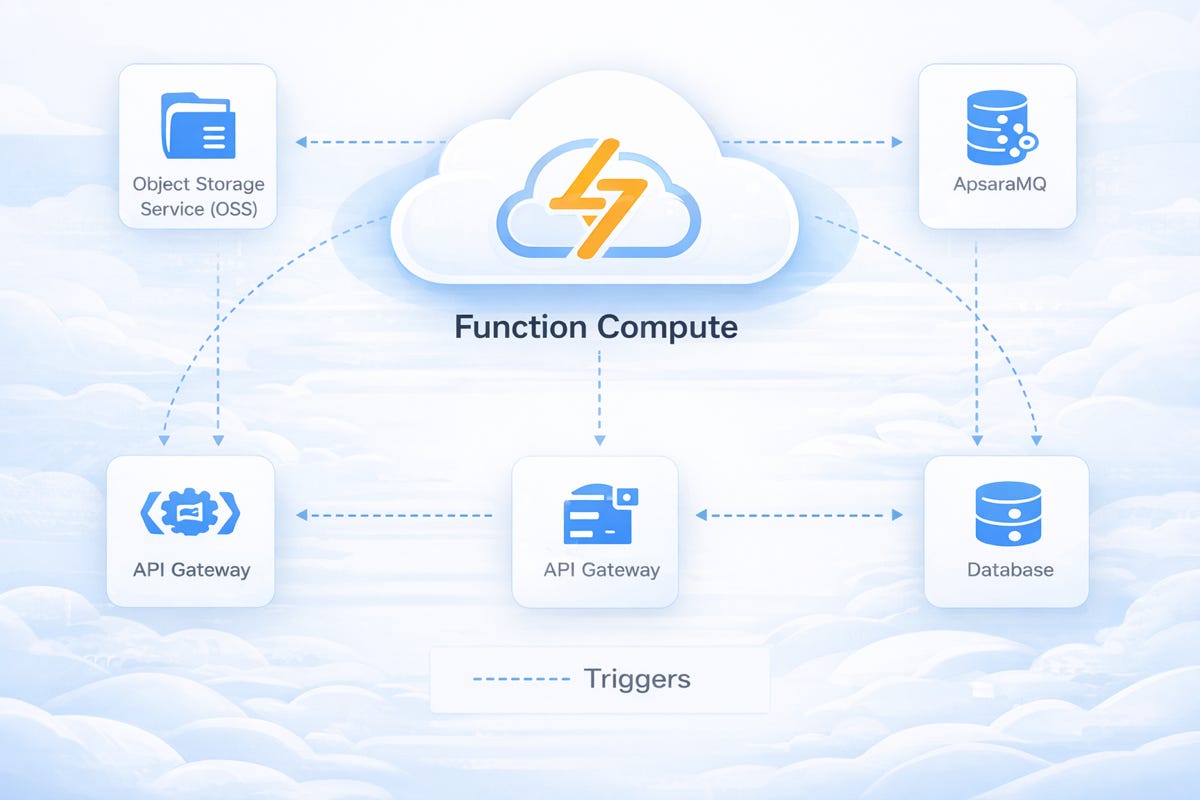
A trigger is what causes the function to run. This could be an HTTP request, a file upload to Object Storage Service (OSS), a message from a queue, or a log event.
When the trigger occurs, Function Compute creates a runtime environment, runs your function, and then scales resources automatically based on incoming workload. If there are no requests, it can scale down to zero, so you are not paying for idle servers.
Key Features of Alibaba Cloud Function Compute
One of the biggest advantages of Function Compute is automatic scaling. Whether you receive one request or thousands per second, the platform adjusts resources behind the scenes.
Another important feature is event-driven execution. Your applications can react instantly to changes in other Alibaba Cloud services, which is powerful for automation and real-time processing.
Function Compute also supports multiple runtime environments, so you can build applications using popular programming languages and frameworks.
Security isolation is built in as well. Each function runs in an isolated environment, helping protect your workloads and data.
Because you are billed based on actual execution time and resource usage, it can be very cost-effective compared to running always-on servers.
Common Use Cases
Function Compute can be used in many different scenarios, especially where flexibility and scalability are important.
A common use case is building APIs and web backends. You can deploy REST APIs or backend services without running a dedicated web server.
It is also widely used for file and data processing. For example, when a file is uploaded to OSS, a function can automatically process it, extract information, or transform the data.
Another popular use case is automation. Functions can respond to logs, monitoring alerts, or scheduled events to perform background tasks like cleaning up resources or sending notifications.
More advanced use cases include AI and data workloads, where functions can be used to run model inference or data processing tasks without managing complex infrastructure.
Function Compute vs Traditional Servers
With traditional ECS servers, you are responsible for operating systems, patches, scaling policies, and high availability design. Even when traffic is low, the servers remain running and continue to generate cost.
With Function Compute, there are no servers to manage. Scaling is automatic, and when there is no workload, resources scale down, reducing costs.
This makes Function Compute a strong choice for applications with unpredictable traffic, event-driven workflows, and teams that want to reduce operational overhead.
Where Function Compute Fits in Your Architecture
Function Compute works well as a backend for web and mobile applications, as part of an event-driven system, or as a processing engine in data pipelines.
It can integrate with other Alibaba Cloud services such as OSS, ApsaraMQ, Log Service, API Gateway, and databases. This allows you to build complete, modern cloud-native applications using a combination of managed services and serverless functions.
Instead of designing infrastructure first, you design your application around events, requests, and small, focused pieces of logic.
Hands-On: Deploy Your First Web Function
Let’s walk through a simple example of deploying a Web Function that returns a basic message over HTTP.
Step 1: Open Function Compute Console
Log in to the Alibaba Cloud Console and navigate to Function Compute. From the overview page, click Create Function.
Console homepage with the “Create Function” button visible.
Step 2: Choose Web Function
When prompted to choose your function type, select Web Function. This option is designed for HTTP-based applications.
“Choose Your Best-Fit Function Type” screen with Web Function selected.
Step 3: Configure Basic Settings
Provide the basic details:
Service name
Function name
Runtime (for example, Node.js or Python)
Keep the default resource settings for this simple test.
Step 4: Add Simple Code
If using Node.js, you can use a basic example like this:
module.exports.handler = async function (req, resp, context) {
    resp.setStatusCode(200);
    resp.send("Hello from Alibaba Cloud Function Compute!");
};
Step 5: Deploy the Function
Click Deploy to upload and activate your function. The platform will prepare the runtime environment automatically.
Step 6: Access the Function URL
After deployment, Function Compute provides a public HTTP endpoint. Open the URL in your browser, and you should see the message returned by your function.
With just a few steps, you have deployed a fully serverless web endpoint without creating or managing any servers. This simple example shows how quickly you can move from idea to running application using Alibaba Cloud Function Compute.